Subscribe to our news:

 Partners
Customers
|
MS SQL Code Factory online Help
Setting common export options
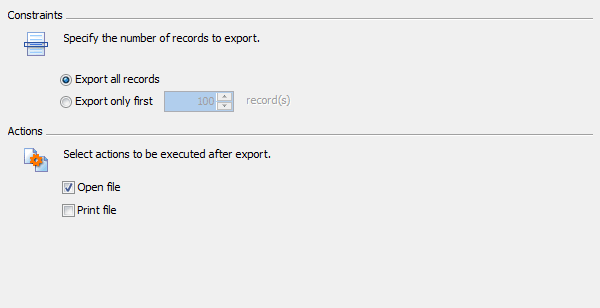
Use this step to specify options to be applied to all exported data:
| • | Select the number of records to be exported from each table: a fixed number or all records. |
| • | Specify actions to be executed after the export. To open the result files in the associated program (MS Excel, Notepad, default browser, etc), check the Open file box. To send the result files to the default printer, use the Print file checkbox. |
|
Company news 
Jul 7, 2023
All software of our Microsoft SQL Server family come now with SQL Server 2022 compatibility.
Apr 10, 2017
New version features colored tabs, new encryption algorithms in data grids, enhanced data input forms, updated data export/import tools and a lot of other useful things.
Sep 20, 2013
New version comes with keyboard interactive SSH authentication, updated Script Runner, redesigned start page, improved SQL editors and data grids, as well as with many other useful things.
Feature of the day
With MS SQL Code Factory you can import data from Excel, CSV, text files and more.
MS SQL Code Factory provides you with all the features (such as viewing, editing, grouping, sorting and filtering) to analyze the data in the most convenient way.
|
|












 Download
 Buy
Buy