







 Partners




SQL Maestro for MySQL product tour
Database Management

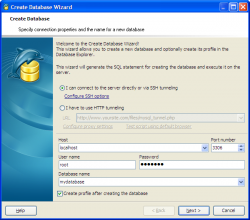
MySQL Maestro gibt Ihnen große Möglichkeiten für die Datenbankverwaltung. Sie sind mit allen notwendigen Werkzeugen versorgt, um die Navigation und Verwaltung von Datenbanken zu verwirklichen. Create Database Wizard ermöglicht Ihnen eine neue Datenbank zu schaffen. Um den Wizard zu starten, wählen Sie den Database | Create New Database... (Datenbank | neue Datenbank erstellen) Hauptmenüpunkt oder klicken den Create Database (Datenbank erstellen) Knopf auf dem Haupt-Toolbar. |
|

|
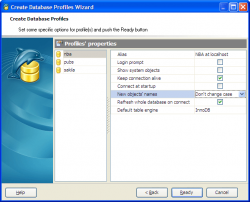
Um die Arbeit mit MySQL-Datenbanken in MySQL Maestro zu starten, sollen Sie zuerst ein Datenbankprofil oder einige Datenbankprofile mit der Hilfe von Create Database Profiles Wizard zu schaffen. Um den Assistenten zu starten, wählen Sie den Database | Create Database Profiles... Hauptmenüpunkt oder benutzen Sie die Shift+Ctrl+P Tastenkombination. Sie können auch den Create Database Profiles Knopf auf dem Haupt-Toolbar klicken. |
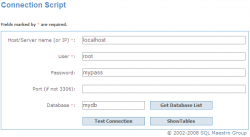
With SQL Maestro for MySQL you can connect to remote MySQL servers with restricted access via HTTP tunneling. For this purpose you need to upload the connection PHP script (mysql_tunnel.php) to your website and enter the script URL as connection option. You can also test the script in your web-browser. |
|
| Zurück | Weiter |