


Choose your database:
AnySQL
MySQL
MS SQL Server
PostgreSQL
SQLite
Firebird
Oracle
SQL Anywhere
DB2
MaxDB

Subscribe to our news:
Partners
Testimonials
Simon Pills: "Someone finally invented an intuitively used and easily customized PostgreSQL database administration tool! Keep up the good work. I will be in touch. I am able to do this horrendous work because your software enabled me to create a new database with all necessary objects in several minutes! I am sure that I have found what I really need".
Daryl Joubert: "I am evaluating your PostgreSQL Maestro product for purchase by my company and thus far I am very impressed! I really like the easy, intuitive and productive user interface and feature set. I am also evaluating a number of other products for PostgreSQL database design and maintenence but thus far SQLMaestro stands head and shoulders above the rest".

More

Add your opinion

PostgreSQL Maestro online Help

Prev Return to chapter overview Next

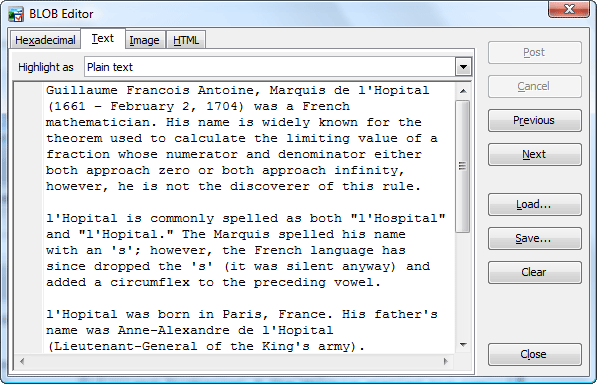
Editing as plain text

The Text panel allows you to edit data as a simple text. Several types of text highlighting are available (Plain text, SQL, XML, Java, VBScript, JScript, Cmd batch, PHP, CSS, UnixShell Script, INI, and HTML). The popup menu of the panel allows you to invoke Find Text, Replace Text and Go to line dialogs.


Prev Return to chapter overview Next