Partners




 Download
 Buy
BuyPHP Generator for MySQL online Help
| Prev | Return to chapter overview | Next |
General

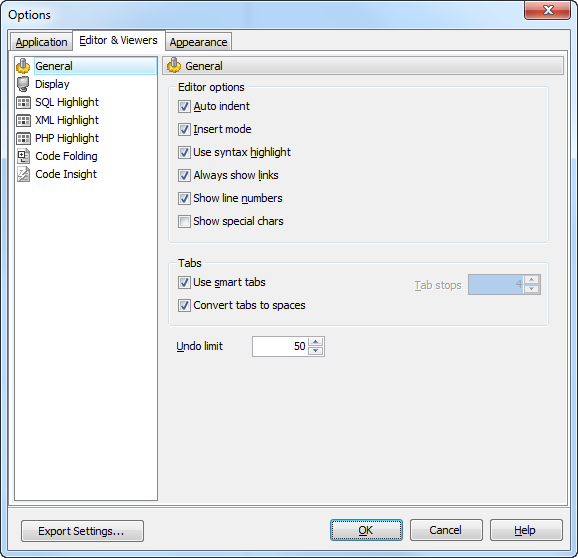
If the Auto indent option is checked, each new indention is the same as the previous when editing SQL text.
 Insert mode
If this option is checked, insert symbols mode is default on.
Use syntax highlight
Enables syntax highlight in the object editor window.
Always show links
If this option is checked, hyperlinks are displayed in the editor window. To open a link click it with the Ctrl button pressed.
Show line numbers
If this option is checked, line numbers are displayed in the editor window.
Show special chars
If this option is checked, special chars (like line breaks) are displayed in the editor window.
Use smart tabs
With this option on the number of tab stops is calculated automatically, depending on the previous line tab.
Convert tabs to spaces
If this option is checked, each time you press the Tab key, the appropriate number of spaces will be added to the edited text.
Tab Stops
Defines the tab length, used when editing text.
Undo Limit
Defines the maximum number of changes possible to be undone.
| Prev | Return to chapter overview | Next |