Partners




 Download
 Buy
BuySQL Maestro for MySQL online help
| Prev | Return to chapter overview | Next |
Setting destination file name and format

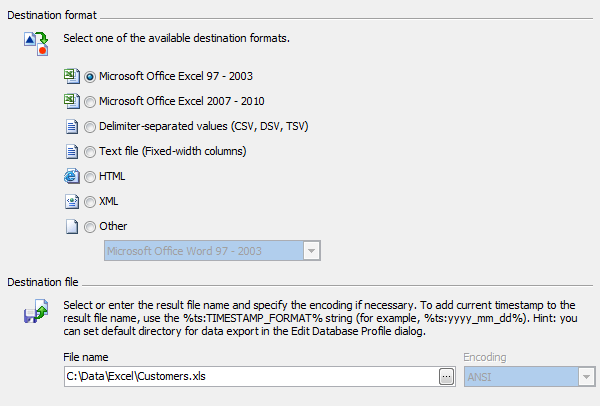
Select one of the available destination formats and set the name for the result file. The file name extension in the Destination file name box varies according to the selected export type.
The file name may contain current timestamp with the %ts:TIMESTAMP_FORMAT% string. Examples of valid log file names:
dbname_export_%ts:yyyy_mm_dd%.log
export_%ts:yyyy_mm_dd_hh_mm%.log
%ts:yyyy_mm_dd_hh_mm_ss%.log
| Prev | Return to chapter overview | Next |