







 Partners




Oracle Maestro: Product Tour
Database Management

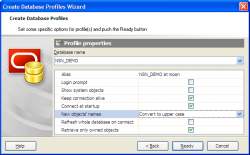
Um die Arbeit mit Oracle-Datenbanken in Oracle Maestro zu starten, sollen Sie zuerst ein Datenbankprofil oder einige Datenbankprofile mit der Hilfe von Create Database Profiles (Datenbankprofile erstellen) Wizard zu schaffen. Um den Wizard zu starten, wählen Sie den Database | Create Database Profiles... ((Datenbank | DatenbankProfile erstellen) Hauptmenüpunkt oder benutzen Sie die Shift+Ctrl+P Tastenkombination. Sie können auch den Create Database Profiles (DatenbankProfile erstellen) Knopf auf dem Haupt-Toolbar klicken.
|
|

|
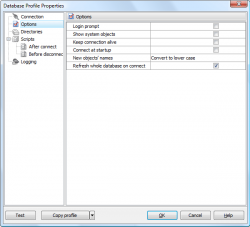
Database Profile Editor consists of several tabs that allow you to adjust the profile behaviour in the most convenient manner. The Connection tab allows you to edit database connection properties and the database alias. Options represents a set of properties to automatize common manipulations with databases (a possibility to connect to the database at Oracle Maestro startup, login prompt before connection, etc.). Use Scripts, After connect and Before disconnect tabs to specify the obligatory scripts to execute after Oracle Maestro will connect to the database or before disconnect from the database. You can also set default directories for database extract, data export, data import, data load, table backup/restore and data dump and specify corresponding log files. |
| Zurück | Weiter |