

Wählen Sie Ihren SQL-Server:
Neuheiten abonnieren

 Partners
 Testimonials
Stephen Arrowel, Database Administrator: "We are in the process of implementing Firebird solutions at multiple levels in our international organization. We expect that SQL Maestro Group will do nothing short of revolutionize the way we develop and maintain our Firebird databases. The continuous improvement and development means that the product is extremely flexible and will grow with us. The service and responsiveness of the Support Team has been exceptional. They have devoted countless hours to understanding our needs, so that we could get a Firebird administration tool which would be so simple and effective in use. SQL Maestro Group is helping Sytrax sail into the 21st Century".
Carl Schammel: "I have been in search of a software product that was rich in features and easy for using, but was unable to find one until I came upon Firebird Maestro. Not only does it have all-inclusive integrated functionality, but SQL Maestro Group have provided me with superior support. I now have the management tools at my hand that I have been looking for".
More
Add your opinion
 Customers
|
Firebird Maestro: Product Tour
Features von Firebird Maestro:
Database Management
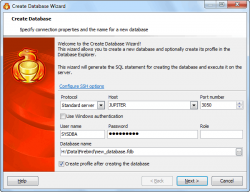
Create Database Wizard führt Sie durch den Prozess der Erstellung einer neuen Datenbank.
Um den Wizard zu starten, wählen Sie den Database | Create New Database... (Datenbank | neue Datenbank erstellen) Hauptmenüpunkt oder klicken den Create Database (Datenbank erstellen) Knopf auf dem Haupt-Toolbar. |
|

|
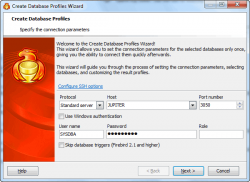
Um die Arbeit mit Firebird-Datenbanken in Firebird Maestro zu starten, sollen Sie zuerst ein Datenbankprofil oder einige Datenbankprofile mit der Hilfe von Create Database (Datenbankprofile erstellen) Profiles Wizard zu schaffen.
Um den Wizard zu starten, wählen Sie den Database | Create Database Profiles... ((Datenbank | Datenbank-Profile erstellen) Hauptmenüpunkt oder benutzen Sie die Shift+Ctrl+P Tastenkombination. Sie können auch den Create Database Profiles (Datenbank-Profile erstellen) Knopf auf dem Haupt-Toolbar klicken. |
|
|