







 Partners



SQLite PHP Generator FAQ
You are welcome to look through the following Frequently Asked Questions list for getting to know the answers to the most commonly asked questions about SQLite PHP Generator.
If you want to ask a question which is not in the list you may apply to our support team.

What is SQLite PHP Generator?
SQLite PHP Generator is a powerful SQLite GUI frontend that allows you to quickly build a professional-quality, 100% responsive website based on your database without any programming. Live Demo.
Would it be possible to take a look at a sample web application built by this tool?
Yes, certainly. Enjoy our online demos. Also you can download the appropriate project files to get familiar with lots of the SQLite PHP Generator features.
What is the difference between Freeware and Professional versions of SQLite PHP Generator?
Please find all the differences in the feature matrix.
How to send a bug report from the program?
To send a bug report, click the More button at the bottom of the main window, then select the appropriate command from the menu, describe the issue and press the Send report button in the dialog window to send the prepared report with your default email client.
If you have any problem sending the report directly from SQLite PHP Generator, you can save it to a file and then send that file to support@sqlmaestro.com as an email attachment.
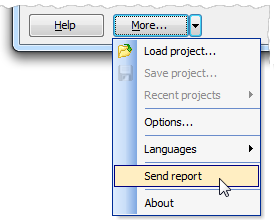
If you have any problem sending the report directly from SQLite PHP Generator, you can save it to a file and then send that file to support@sqlmaestro.com as an email attachment.
Is it possible to get a list of changes made in the minor versions?
Yes, there is the complete changelog.
How can I save my work between SQLite PHP Generator sessions?
Click the More button at the last wizard step and select the Save Project item to save the current configuration.
Is it possible to edit php code generated by SQLite PHP Generator?
Of course you can modify the generated code but, unfortunately, we have no possibility to provide any support on this.
I installed SQLite PHP Generator and generated a first script, but it produces just a blank page.
Try to turn ON the "Force show PHP errors and warnings" option in the Project Settings dialog. Then refresh the page in the browser to see a more informative error message. It also makes sense to take a look at the web server logs.
Is it possible to execute a custom SQL query from an event handler?
Yes, it is possible for server side events. See the Developer Reference section in the manual for more information and examples.
After uploading of a generated project on my webserver I came up with this kind of error: Parse error: syntax error, unexpected T_OBJECT_OPERATOR in my_page.php on line XX.
The code produced by PHP Generator requires PHP 5.2 or higher. Please make sure you have installed the correct PHP version on your webserver.
Does your software support lookup options?
Yes, it does. Moreover, lookup menus are generated automatically if your database contains the appropriate foreign key constraints.
Is it possible to handle many-to-many relationships with SQLite PHP Generator?
Yes. Please find a couple of examples in our Feature Demo.
What variables can I use in events and templates?
This is covered in the "Using Variables" section of the manual.
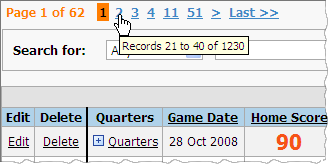
How can I determine the total number of records in the table/view/query using a PHP script created with your product?
Use the mouse hint for the page numbering area:
Can I incorporate features provided by a third-party library in the script created by SQLite PHP Generator?
Yes, PHP Generator allows you to activate third-party components. Find out details in the corresponding article.
How can I supply pages created by SQLite PHP Generator with look and feel of an existing website?
The simplest way is to use the <iframe> tag. Live example.
Is there a way to add a new action link or button to link to a custom php page?
The current version of SQLite PHP Generator doesn't support such feature directly, but there is a simple workaround: you can replace the original content of an existing data column with the required link or button using the OnCustomRenderColumn event. For example, to display the "Do something" link referencing to the dosomething.php script file instead of the original data stored in the 'data_field' column, specify the event body as follows:
In case your table has no column to replace, create a custom query based on this table with an additional stub column. Hopefully a more convenient support for row-level command buttons will be added within one of the next releases.
Listing 1.
if ($fieldName == 'data_field')
{
   $customText = '<a href="dosomething.php?id=' .$rowData['id'] .'">Do something</a>';
   $handled = true;
}
How to add a new link to the application menu?
The simplest way is to use the OnCustomizePageList event. It is also possible to provide a custom template as described in this article.
Is it possible to use variables within the lookup filter condition?
Yes. The correct syntax is as follows: owner_id = %CURRENT_USER_ID%.
I got the following error message: DateTime::__construct() [datetime.--construct]: Failed to parse time string at position 6: Unexpected character.
You have to specify the correct time zone in the php.ini file as described in the PHP manual.
I want to send an email notification after a user inserts or updates a record.
Use the OnBeforeInsertRecord / OnBeforeUpdateRecord events and our sendMailMessage function. Live examples.
I set outgoing mail server settings, but emails are not sent
If you use Google Mail or Yahoo, please make sure you allowed sending mail via SMTP. Otherwise please contact your ISP for details.
Export to PDF does not work for me as I got the following error message: Fatal error: Allowed memory size of X bytes exhausted (tried to allocate Y bytes) in path_to_file\pdf_renderer.php on line Z.
The export works just fine. Try to increase the PHP memory limit.
I have a table with a column storing values computed from an expression that use other columns in the same table. How can I use OnbeforeInsertRecord and OnBeforeUpdateRecord events to add the values automatically?
Suppose, you have a table with the 'totalcost' column which values are calculated using the 'unit_cost' and 'quantity' column values. To fill the column automatically, use the following code at the OnBeforeInsertRecord and OnBeforeUpdateRecord events:
Listing 2.
$rowData['totalcost'] = $rowData['unit_cost'] * $rowData['quantity'];
What is the correct syntax for items containing spaces in Combobox and Radio Group editors?
It is as follows: "stored value 1=display value 1","stored value 2=display value 2". For example, 1=Small,2=Large,"3=Extra large".
Is it possible to display NULL values as empty strings?
Yes. You can change the appropriate line in the language file. However, please don't forget that NULL and empty string are different things.
Which SQLite server latest version is supported by your software?
SQLite PHP Generator can be used with SQLite server versions up to 3.x.x.
After uploading a project on my webserver I came up with this kind of error: Parse error: syntax error, unexpected T_OBJECT_OPERATOR in path\to\project\web\index.php on line 12?
The code produced by PHP Generator requires PHP 5. Please make sure that you have installed the correct PHP version on your webserver.
How can I find out the date of my current product version release?
Product versions are formalized according to the date of release. For more information, please refer to the appropriate news article.