Subscribe to our news:

 Partners
Testimonials
Andrew Maclean: "I am really quite impressed with the software. You and your people are doing a wonderful job. I actually have spent a while researching PostgreSQL admin/code generators and yours seems to fit our needs nicely. Your interface is beautiful".
Chris Passion: "I tried 3 different programs before yours and none would be so handy and helpful. PostgreSQL Maestro works great and couldn't be easier to install".
More
Add your opinion
Customers
|
PostgreSQL Maestro: Product Tour
Features of PostgreSQL Maestro:
Getting Started

|
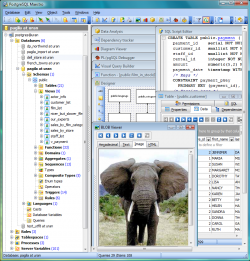
PostgreSQL Maestro is a powerful Windows GUI solution for PostgreSQL server administration and
database development.
PostgreSQL Maestro is designed to meet the requirements of PostgreSQL users and allow them manage their databases
simpler and more comfortable. This tool provides you with a lot of exceptional client-side features making
your work with PostgreSQL easy and efficient:
- Support for all versions of PostgreSQL versions starting from 7.3 including roles, tablespaces, partitions,
extensions, and so on;
- User-friendly interface with
navigation style,
well-described wizard system, quick launch panel for performing the commonest operations;
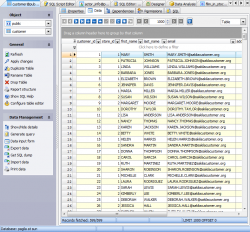
- Easy PostgreSQL database objects management;
- Visual Database
Designer with reverse engineering and a lot of other features;
- PL/pgSQL Debugger to
investigate and fix your PL/pgSQL code in the shortest way;
- Comfortable access to the PostgreSQL security features;
- Powerful tools for working with SQL queries including
Visual Query Builder;
- Flexible customization of the application.
With all its features PostgreSQL Maestro will be an everyday assistant in your work with PostgreSQL server. |
|

|
The list of useful features provided for PostgreSQL Maestro users can be continued.
The following advanced features are provided for your use:
- Easy database management: the conception of
database profiles
gives you the opportunity to connect to databases in one touch and work with the selected databases only;
- Powerful BLOB viewer/editor:
view and edit the content of the BLOB fields in various representations;
- Data export tools:
export your data from PostgreSQL tables and queries to 20+ most popular formats including MS Excel, MS Access,
MS Word, HTML, XML, PDF, and more;
- Data import tools:
import your data to PostgreSQL tables from MS Excel, MS Access, XML, DBF, TXT, and CSV;
- Report designer:
generate well-looked printable reports from your database in a few minutes.
The list above is not complete. PostgreSQL Maestro allows you, for example, to
create a new table in a few mouse clicks,
get SQL dump of your metadata and data,
run SQL scripts,
copy a table from one database to another by drag-n-drop operations or by pressing
Ctrl+C/Ctrl+V hot key combinations and a lot of other features.
|
|
|