







 Partners




 Download
 Buy
BuyPostgreSQL Maestro online Help
| Prev | Return to chapter overview | Next |
Fields

Table columns and composite type fields are created and edited within the Field Editor. The information below are useful for editing of table fields. Composite types' fields admit to editing the comment only.

To add a new table column, you should either:
or
or
|
Table fields are edited within the Field Editor dialog window. In order to open the dialog you should either
or
You can change the name of the field using the Rename Field dialog. To open the dialog you should either
or
|
To drop the table field:
or
and confirm dropping in the dialog window.
|
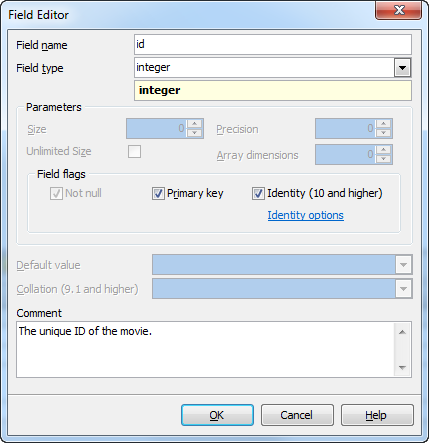
To specify the Data Type, select it from the drop-down list.
Note: the name of the object must be unique among all the object names in the table. You can use any identifier that is allowed by PostgreSQL server.
Parameters
Use the Size edit box to define the length of the field value for integer, float, char and other data types and use Precision to define the precision of the field value, e.g. for float data type.
Check the Unlimited Size option to remove value limitations for VarChar, Timestamp, TimestampTZ, Interval, Time, TimeTZ, VarBit, Decimal data types.
Use the Array dimensions to set the dimension of data array.
Check the Use dimension option to set the dimension properties for field types with unnecessary dimension properties (e.g. integer, float, or timestamp types).
Field flags
 Not Null
Forbids the NULL values for the field.
Primary Key
With this option checked the field becomes the only field with a primary key. If you check this field, you will not be able to set this attribute for any other field in the table. Hence if you want to create a compound primary key, do not check this field but create a primary key through the Indexes tab of Table Editor or the appropriate step of Create Table Wizard.
Identity (PostgreSQL 10+)
Indicates that the new column is an identity column. Click the "Identity options" link to customize the appropriate properties.
Collation (PostgreSQL 9.1+)
Specify a collation to the column to define the sort order and character classification behavior of column data. The collation must be of a collatable data type. If not specified, the column data type's default collation is used.
Default value
Within the box you can assign a default value for the field column. The action is optional. If the default value was specified during the new row created and no values is specified for some of the columns, the columns will be filled with their respective default values.
The Comment box allows you to set optional text describing the field.