Partners




 Download
 Buy
BuyPHP Generator for MySQL online Help
| Prev | Return to chapter overview | Next |
View controls

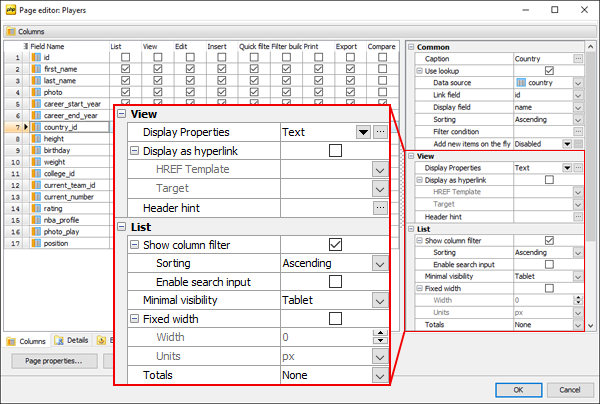
The View options define the way the column data is displayed on List, View, Print, Export, and Compare pages.
Display properties
Select the way to be used to represent column data from the drop-down list. Available controls are as follows:
| • | Text |
To set the format to be applied to the column data such as text alignment, image size, and so on, use the dialog opened by the ellipsis button. By default, the format is the same as it is set at the Project options.
Along with available formatting options you can specify any property you want using the Custom attributes option. This option allows you to specify the content of standard HTML style tag applied to the column data.
The Null Label property allows you to customize the representation of NULL values at the column level.
To implement a conditional data formatting, use the OnCustomDrawRow or OnExtendedCustomDrawRow events.
Display as hyperlink
To represent the column's data as hyperlink, check the Display as hyperlink option and specify the HREF Template. Target controls where the new document is displayed when a user follows the link.
_blank |
opens the new document in a new window. |
_parent |
is used in the situation where a frameset file is nested inside another frameset file. A link in one of the inner frameset documents which uses "_parent" will load the new document where the inner frameset file had been. |
_self |
puts the new document in the same window and frame as the current document. "_self" works the same as if you had not used TARGET at all. |
_top |
loads the linked document in the topmost frame... that is, the new page fills the entire window. |
Header hint
Use this field to specify the the column caption's hint. By default, it is a comment to the table/view column.
Linked Images
This feature is an alternative way for displaying master/detail data when the detail data source stores filenames for external images (for example, the master table stores information about photo albums while the detail table stores information about album photos). These images are displayed in the popup window when you click a cell in a grid column linked images are associated with. Live Demo.
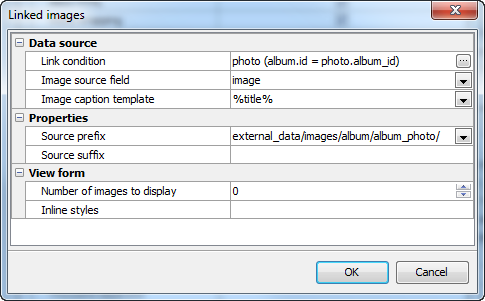
To activate linked images for a column, set the corresponding option to "Enabled", then click the ellipsis button and provide values for the controls in the modal dialog as described below.
Link condition
Click the ellipsis button to invoke a modal dialog that allows you to select a data source containing information about external images and the columns to be linked.
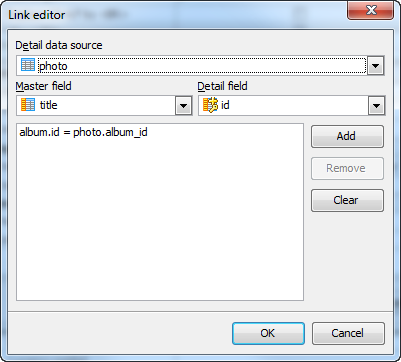
Image source field
A column in the image data source where image file names are stored.
Image caption template
The value of this property (if specified) is displayed below the left bottom corner of each image. You can use here column names from the image data source wrapped by percents, for example, %title% (%id%).
Source prefix and Source suffix
These properties allow you to improve the flexibility of the application. For example, if files are stored in the media directory, you can specify the value of the Prefix property as 'media/' and store in the database only short file names. If one day you decide to rename the directory, the only thing you will need to change is the value of this property. In short, the actual filename is calculated as follows: Source prefix + value_stored_in_the_database + Source suffix.
Enter topic text here.
Number of images to display
The value of this property defines number of images to be previewed in the View form. Default value is 0 (no images are previewed).
Inline styles
Allows you to specify the value of the style attribute of each <img> tag in the View form. For example, the following value can be used to limit the width of previewed images:
max-width: 150px;
| Prev | Return to chapter overview | Next |