







 Partners



 Download
 Buy
BuyMaxDB PHP Generator online Help
| Prev | Return to chapter overview | Next |
Data Partitioning

The Data Partitioning wizard allows you to create a custom pagination i.e. split the records on the generated page by a specified criteria. Live demos.
Partitioning types
Supported partitioning types are as follows:
Range partitioning
Selects a partition by determining if the partitioning expression value is inside a certain range. Live demo.
List partitioning
A partition is assigned a list of values. If the partitioning expression value has one of these values, the partition is chosen. For example, all rows where the column 'Country' is either Iceland, Norway, Sweden, Finland or Denmark could build a partition for the 'Nordic countries'. Live demo.
Custom partitioning
Create your own partitioning with fill partitions and build conditions functions. Live demo.
To disable data partitioning, select None in the drop-down list, then press OK.
Partition navigator options
Navigator caption
Defines the caption of the label to be displayed

Navigation style
Defines whether the partition navigator is displayed as a list of hyperlinks or as a combobox.
Allow to view record from all partitions
Enable/disable this option to allow/deny viewing data from all partitions.
Example 1 (Range partitioning)
There is a table storing information about films such as title, release year, and length.
CREATE TABLE film ( film_id integer NOT NULL, title varchar(255) NOT NULL, release_year integer, length integer UNSIGNED, /* Keys */ PRIMARY KEY (film_id) );
|
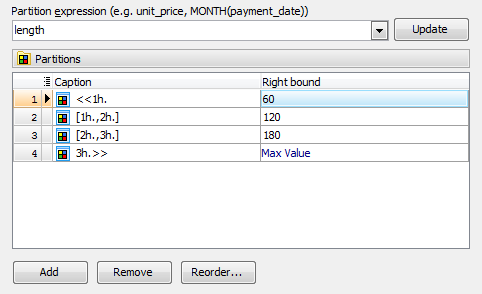
To create a pagination by the film length, select Range partitioning at the first wizard step, choose 'length' as partition expression and set the partitioning ranges as follows:
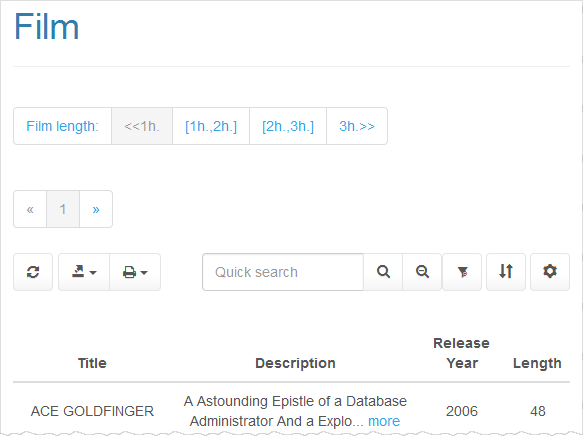
Here you can see the result PHP script:
Example 2 (Custom partitioning)
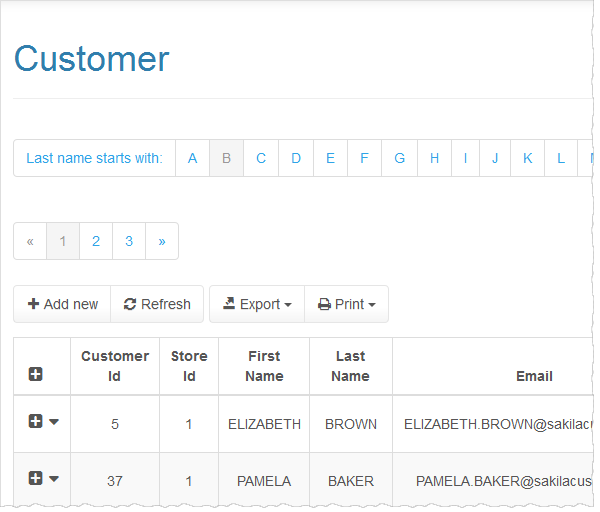
Assume that a table 'customer' contains the 'last_name' column. Our goal is to group customers by the first letter of their last name as displayed below.
To get around such a situation, select Custom partitioning and define functions as follows:
function GetPartitions($partitions)
{
$tmp = array();
$this->GetConnection()->ExecQueryToArray("
SELECT DISTINCT
left(c.last_name, 1) as first_letter
FROM customer c
ORDER BY first_letter", $tmp
);
foreach($tmp as $letter) {
$partitions[$letter['first_letter']] = $letter['first_letter'];
}
}
function GetPartitionCondition($partitionKey, &$condition)
{
$condition = "left(last_name, 1) = '$partitionKey'";
}