Partners



 Download
 Buy
BuyFirebird Maestro online Help
| Prev | Return to chapter overview | Next |
Exception Editor

Exception Editor allows you to edit the exception properties, view the SQL statement for creating the exception, etc. It opens when you create a new exception or edit the existing one (see How to edit exception for details).
The basic principles of Object Editors in Firebird Maestro are explained in a separate topic. Below you will find a description of editor tabs that are unique for the current object.
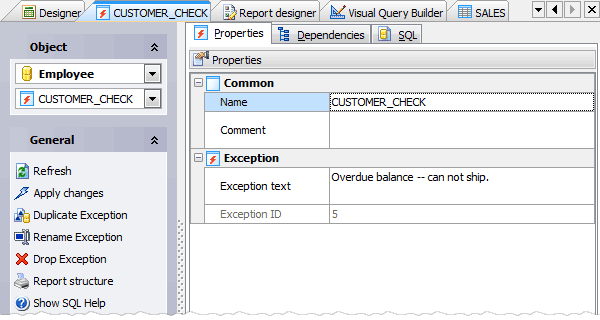
Specify exception properties according to your needs. The detailed description is given below.
Name
Defines a name for the exception. The name of the exception must be unique among all the exception names in the database.
Comment
This field stores a comment to the exception.
Exception text
Defines exception message containing alphanumeric characters and punctuation.
Exception ID
Shows ID number of the exception.
You can find the detailed description of exception properties in Create Exception (Firebird SQL Reference).
To apply the changes, select the Apply Changes item in the Navigation bar or use Ctrl+F9 or Ctrl+F7 shortcut keys.
It is also possible to modify object properties without opening the object editor: use the Object Properties item of the popup menu of the selected object from the explorer tree.
| Prev | Return to chapter overview | Next |