Partners








 Download
 Buy
BuyAnySQL Maestro online help
| Prev | Return to chapter overview | Next |
Data View

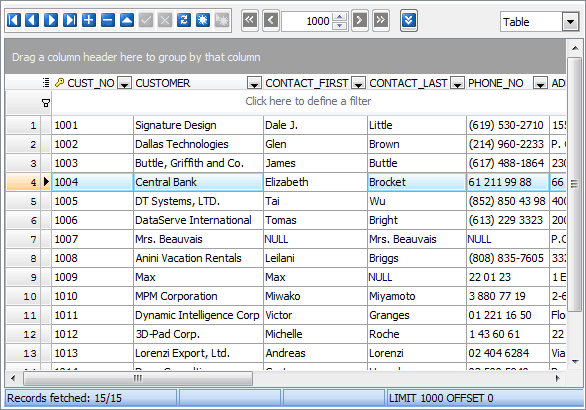
AnySQL Maestro represents all data (stored in tables and views, results of queries and procedures) in grid or in info cards. By default, data is displayed in a grid - tabular view of data. To change the type of the data representation, use the drop-down list at the top of the tab. Both of the data representations support UNICODE/UTF-8 data. The status bar displays the number of records in the current data set. To reset grid to default settings, open the Data tab when holding the Ctrl key.
Navigation buttons
Both data representations are equipped with navigation buttons. They are represented at the top of the data tab and allow you to navigate between records and to accomplish common operations:
| • | To add a new record, use the Plus button or the Insert shortcut. |
| • | To delete a new record, use the Minus button or the Delete shortcut. |
| • | To edit an existing record, push the corresponding button or invoke the Data Input Form using popup menu of the necessary record, with Ctrl+Alt+D shortcut, or with the corresponding link at the Navigation bar. To edit a field value, click it and enter the new one inline. |
The pagination option allows you to limit the number of browsed records. By default, the number of records represented in grid at once is 1000. To change the number of records represented in the current grid, enter the necessary value in the pagination bar. To specify the default one or to disable pagination, use the data grid option.
Navigation bar
The Data management group of the Navigation bar allows to invoke Data Input Form, SQL Editor with SELECT query, Data Export, and Data Import modules using corresponding links, also get SQL dump of the current data set and print current data with enabled preview in WYSIWYG mode.
See also: Table Editor, SQL Editor, Visual Query Builder
| Prev | Return to chapter overview | Next |