







 Partners


MaxDB Data Wizard product tour
ASP.NET Generator

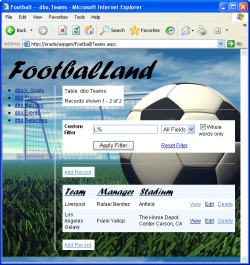
ASP.NET Generator is a premier tool aimed on producing a full set of ASP.NET for further work with MaxDB tables, views and queries through the web. Using ASP.NET Generator, you can instantly create web pages that allow users to view, edit, filter, add and delete records from your
The generated scripts support Lookup options. Bringing the IDs stored in one table field into correlation with the names stored in another table allows the target html page to contain all the correlated data. As a result, while working with the site you will only need to select the required names instead of entering the IDs. ASP.NET Generator creates ASP.NET code directly from the database tables and queries. The generated codes are clean, straightforward and easy-to-customize. Standard HTML templates can also be used with the program to create dynamic Web pages and Web sites. |
|

|
Above all, ASP.NET Generator Wizard provides an ability to specify Security Options allowing you to request user name and password when someone attempts to access your script or to execute some of the specific actions: detailed viewing, adding, editing, or deleting of a table/query row.
You can set authentication of users attempting to access the whole script or some specific security options, e.g. for editing records. When setting user name and password, you can either enter them manually within the wizard step or use those stored in one of the existing databases.
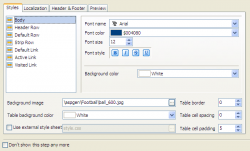
ASP.NET Generator introduces full script customization. The wizard allows you to attune all HTML appearance of result web pages, to adjust script content: the number of records on the page, the navigation place on the page, etc. |
| Weiter |