

Choose your database:
AnySQL
MySQL
MS SQL Server
PostgreSQL
SQLite
Firebird
Oracle
SQL Anywhere
DB2
MaxDB

Subscribe to our news:
Partners
Testimonials
Terry Prank: "At first, I was skeptical as is anyone encountering a new product on the web. I even tried out a couple of the competitors because I figured SQL Maestro Group sounded too good to be true. I soon learned the hard way, nothing I have seen on the market right now compares. Let the results speak. Within the first several hours of operation, I understood that the products are beyond comparison".
Andrew Rassel: "I just wanted to let you know how satisfied I am with your administrative tools. I have been consistently receiving your support. I think you have wonderful products and I am highly satisfied with the results that I am getting".

More

Add your opinion

MaxDB Data Wizard online Help

Prev Return to chapter overview Next

Code Folding

The Code Folding item group makes it possible both to view the whole text and to divide it into logical parts (regions). Each part can be collapsed and extended. In extended mode the whole text is displayed (set by default), in collapsed mode the text is hidden behind one text line denoting the first line of the collapsed region.
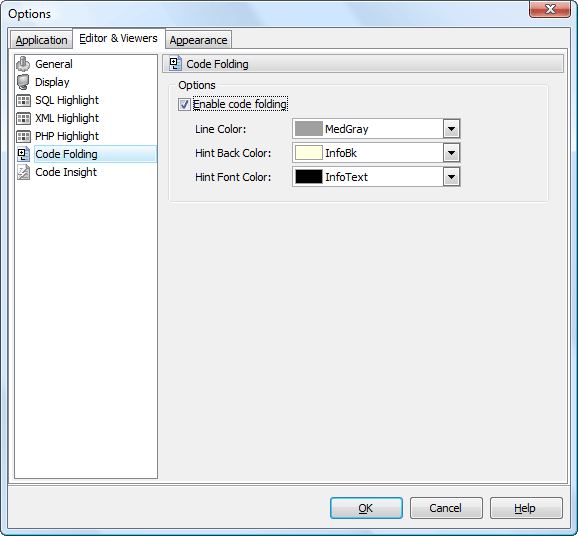
 

You can enable/disable code folding in SQL editors and viewers and customize the colors of its items.


Prev Return to chapter overview Next