EN
DE
News
Products
Download
Purchase
Support
Contacts
Product Information
About
Product tour
News
Screenshots
Testimonials
Support Information
Documentation
FAQ
Support
Download
Purchase
Choose your SQL server:
Subscribe to our newsletter
Customers
More
Become a customer
Testimonials
Adam Allen:
"
I just have to say WOW!!! I'm so glad that you guys have developed something that is so useful for MySql. I am able to graphically view my tables, and I don't even have to think about my queries because I can visually design them. I just stumbled upon this, and I'm already very excited about it
".
Michael Dunn:
"
We're good to go though, thank you again, this is by far the best MySQL interface I've had the opportunity to work with
".
Joe Rose:
"
SQL Maestro for MySQL is a great program. I never had any glitch's. It is so easy to use. I made the class work much easier
".
Padster Reynolds:
"
Good software that has become one of our must have tools - wouldn't like to be without it these days. Keep up the good work
".
More
Add your opinion
SQL Maestro Group
/
Products
/
MySQL
/
SQL Maestro for MySQL
/
Screenshots
/
Getting Started
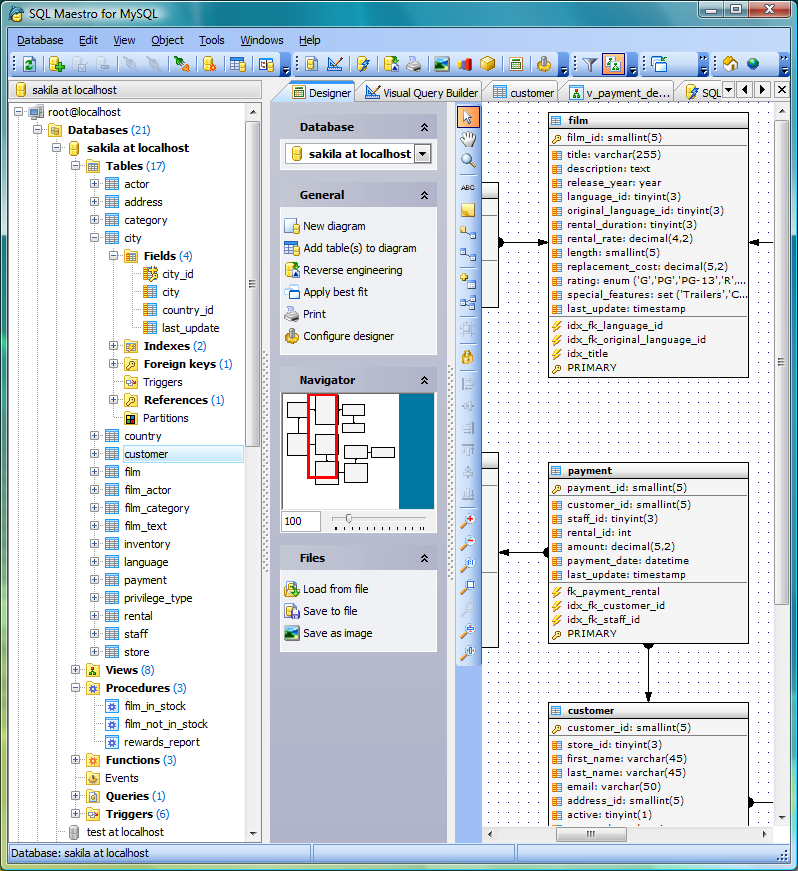
/ Tabbed MDI Interface
Download
Buy
SQL Maestro for MySQL screenshots
Getting Started
Database Management
Database Designer
MySQL Security System
Queries and Scripts
Next
Classic MDI Interface
|
Tabbed MDI Interface
|
Database Explorer
|
Object Browser
|
Database Designer
|
Process Browser
|
Data Analysis
|
SQL Editor: Quiery Autocomplete
|
SQL Formatter
|
Executing Queries
|
Grid modes
|
SQL Script Editor
|
Visual Query Builder
|
SQL Generator
|
Blob Editor
|
Diagram Viewer
|
Table Editor: Fields Reordering
|
Table Editor: Working with Data
|
Lookup Editor
|
Master-Detail Data View
|
Table Partitions
|
Grants and Permissions
|
Generating Database Report
|
Import Data
|
Export Data
|
Support for large fonts
|
Support for UTF-8 data
|
Connecting via HTTP Tunnel
|
Editing SET values
|
Editing enum values
|
Start Page