

Choose your database:
AnySQL
MySQL
MS SQL Server
Oracle
PostgreSQL
SQLite
Firebird
SQL Anywhere
DB2
MaxDB

Subscribe to our news
Partners
Testimonials
Adam Allen: "I just have to say WOW!!! I'm so glad that you guys have developed something that is so useful for MySql. I am able to graphically view my tables, and I don't even have to think about my queries because I can visually design them. I just stumbled upon this, and I'm already very excited about it".
Tad Stephens: "I think this is a great product and your quick and helpful reply has shown me the support is there as well. I will purchasing my license today".

More

Add your opinion

SQL Maestro for MySQL online help

Prev Return to chapter overview Next

Grouping data

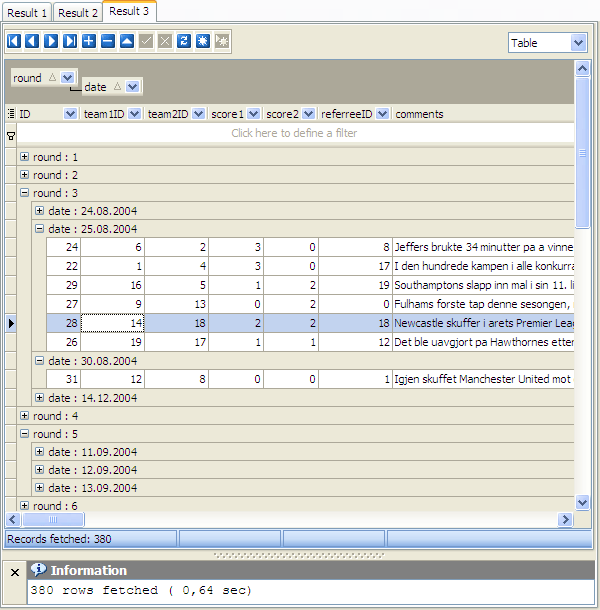
You can group grid data by any of the columns by dragging the column header to the destination area.  Now all the records are displayed as subnodes to the grouping row value as shown in the picture. To reverse grouping, just drag the column name from the upper area back.


Prev Return to chapter overview Next