Partners




 Download
 Buy
BuyCode Factory for MySQL online Help
| Prev | Return to chapter overview | Next |
Data input form

Use Data Input Form to add new records or edit existing ones. To invoke the dialog, use the corresponding link from the popup menu or Ctrl+Alt+D shortcut.
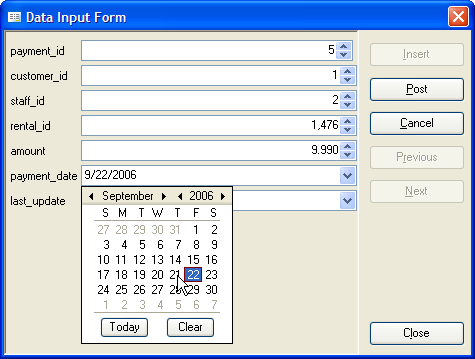
The dialog's fields contain the values of the current grid row. Use the Insert button to enter values of a new record and the Post button to update the current row. The Cancel button reverts all the field values within a form to their initial values (or to the last posted values). The Previous and Next buttons allow you to switch between grid records without closing the dialog.
Controls containing values of primary and foreign key columns are marked with the 'gold key' and 'silver key' images accordingly. Controls containing values of required (NOT NULL) columns are marked with a red asterisk.
There are possibilities to use lookup editors on working with columns linked with foreign keys, a calendar for timestamp columns and a calculator for decimal ones.
| Prev | Return to chapter overview | Next |