Partners




 Download
 Buy
BuyMS SQL Data Wizard online Help
| Prev | Table of Contents | Next |
Getting Started

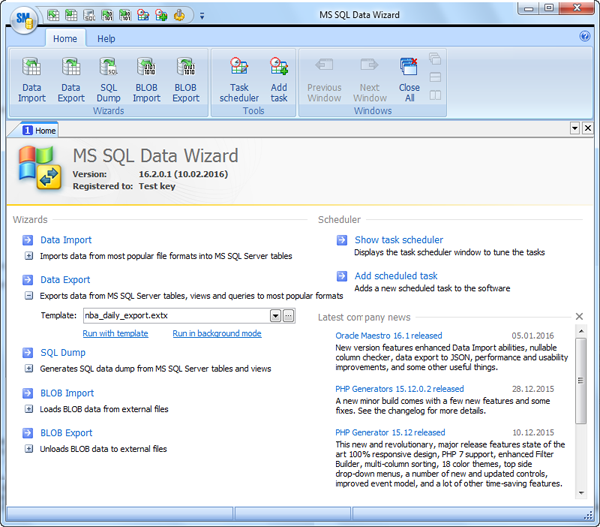
The Home page contains a set of links to run all the wizards included into the software. Each wizard may be run in 3 ways:
| 1. | Run in a usual way |
In this way you need to customize all the process parameters step by step. To invoke a wizard, use the wizard's link at the Home page or the wizard's button on the Ribbon toolbar.
| 2. | Run with template |
On running a wizard in this way, you'll get all the session parameters loaded from a template file and ready for manual editing. To run a wizard with a template, specify a template to load and use the Run with template link at the Home page. The template file must be created during a previous wizard session.
| 3. | Run in background mode |
This way is useful if you already have a template which does not require further customizing. To supply a wizard with all the session parameters from a template file and execute it in background mode, specify a template file at the Home page and click Run in background mode. Besides, you can specify a time to execute the task within the Task Scheduler.
To learn more about the wizards, follow the links:
| Prev | Table of Contents | Next |