DB2 Maestro online Help
| Prev |
Return to chapter overview | Next |
What's new
12/12/2008 - DB2 Maestro 8.12 released
Server management extensions:
| • | All the bugs reported by our users and found by ourselves since first official release have been successfully fixed. |
| • | Get SQL Dump Wizard now can generate multi-row INSERT statements. Also the wizard has been redesigned to increase the usability. |
Interface improvements:
| • | Visual Query Builder has been dramatically improved. Now it can produce INSERT, UPDATE and DELETE statements as well as the statements containing subqueries. |
| • | Tabbed MDI interface: a popup menu has been added to each tab. |
| • | Data grid features the following things: |
| o | Starting with this version it is possible to use the lookup editor for a column, which is linked by a foreign key with a (single) column from another table. The editor displays the contents of parent table’s columns within the dropdown window. |
| o | A possibility of displaying data in the master-detail form has been incorporated into the Table Editor (multiple detail pages can be displayed for a single master row). Use the Show/Hide details link at the editor’s navigation bar to activate/deactivate this view mode. |
| o | Filtering, grouping, and sorting features become available for CLOB columns. |
| o | The notification pane is now displayed after simple mode activation (filtering, grouping and sorting features are not supported in this mode). All the related settings can be customized in the Options dialog. |
| o | It is now possible to restrict maximum column width. |
| • | The Dependency tracker tool has been implemented (Main Menu | Tools | Dependency tracker). Use this tool to browse all-level dependencies of a schema object (table, view, function, etc). |
| • | SQL Script Editor: Script Explorer has been implemented. |
| • | A French localization is now included into the installation package. |
| • | This version of our software is fully compatible with large fonts (120 DPI). |
| • | SQL Editor: a popup menu has been added to each query tab. Using this menu you can create a new query, close existing one, save the query to profile, etc even if editor's navigation bar is closed. |
| • | SQL Script Editor settings: the "Use script runner for large scripts" option has been added. |
| • | Create Database Wizard, Create Profiles Wizard, and object creation wizards become resizable. |
| • | All schema object (table, view, procedure, etc) editors: the tab captions are now displayed as object@schema instead of schema.object. This should increase the usability while working with a lot of objects in the same schema. |
| • | The F11 key is now used to show/hide the Explorer tree. |
| • | Database Explorer: the Data management group has been added to table and view nodes popup menus. Use this group items to run Data Export, Data Import, and Get SQL Dump wizards for the selected table or view without opening its editor (the Empty Table command has been moved to this group too). The Go to foreign table command is now available for all the foreign keys. |
| • | Database Designer settings: the "Show hints" options has been added. Also it is now possible to select the default graphic file format to export diagrams as images. |
04/30/2008 - First public release of DB2 Maestro
DB2 Maestro is a powerful solution for administering DB2 databases. It allows you to create, edit, copy, and drop tables and views, build queries visually, execute queries and SQL scripts, design your database as ER diagram, view and edit data including BLOBs, analyze data summarized into multidimensional views and hierarchies (OLAP cubes), represent data as diagrams, export and import data to/from most popular file formats and use a lot of other tools designed for the easiest and most efficient work with different databases.
Our product release versions are formalized according to temporal principles: the first figure of the product version stands for the year of release; the second figure of the version is meant to indicate the month of the current version release. Hence, the present version is 8.4.
While developing the new software product we tried to include the usable features available in the existing products and to provide it with unique functionality. Please consider the short list of DB2 Maestro features below:
| • | universality: you can use the software to work with any database engines simultaneously; |
| • | easy database management: the conception of database profiles gives you the opportunity to connect to databases in one touch and work with the selected databases only; |
| • | powerful database object management: the application includes a number of handy wizards and editors, database explorer allowing you to perform all necessary operations upon databases and their objects (creating new database objects, editing existing ones as well as duplicating and renaming objects); |
| • | user-friendly interface: easy-to-use GUI provided by DB2 Maestro will make your database management and administration easy and efficient; the tabbed interface is implemented in addition to classic MDI; data can be viewed either as tables or as summary cards; |
| • | Object Manager and Object Browser: allow you to fulfill complex data manipulation tasks irrespective of your personal level of competence in this or that server feature; |
| • | building and executing queries: DB2 Maestro provides powerful tools which allow you either to edit query text directly with syntax highlighting and code completion or to build a query diagram visually selecting tables and fields, setting links between tables and so on; |
| • | database designer: allows you to create physical ER Diagram that will represent objects and relations in your database database; |
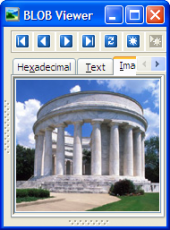
| • | powerful BLOB viewer/editor: opportunity to view and edit the content of the BLOB fields in various representations such as hexadecimal dump, plain text, graphical image or HTML page; graphical representation of BLOB data supports the following image formats: BMP, Windows metafile, JPEG, GIF and PNG; |
| • | data export module: exporting data from your tables and queries to files of the 14 most popular formats including MS Excel, MS Access, MS Word, HTML, XML, PDF; |
| • | data import module: importing data to your tables from files of the following formats: MS Excel, MS Access, XML, DBF, TXT and CSV. |
The list of useful features implemented in our software can be continued. DB2 Maestro gives you opportunities to create a new database object in a couple of simple operations, to get SQL dump of your metadata and data (even without knowing the syntax), to execute any SQL script, format text of your SQL queries, to copy a table from one database to another by drag-n-drop operations or by pressing Ctrl+C/Ctrl+V hot key combinations and a lot of other features.
To summarize all the features available in DB2 Maestro, we hope that you will enjoy working with your databases!
| Prev |
Return to chapter overview | Next |