Partners




 Download
 Buy
BuyPostgreSQL Maestro online Help
| Prev | Return to chapter overview | Next |
Visual Query Builder

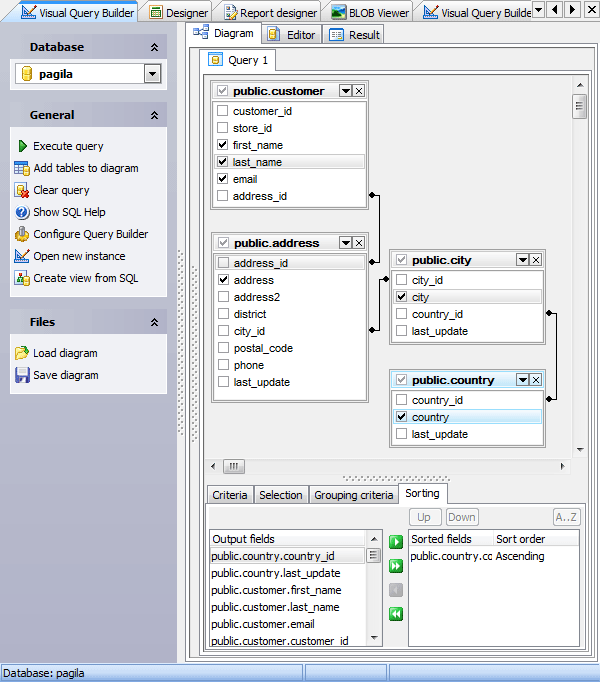
Visual Query Builder is provided for building data manipulation statements visually. It allows you to create and edit queries without knowledge of SQL, prepare and execute queries, and view the results of the execution. Builder can produce INSERT, UPDATE and DELETE statements as well as the SELECT statements containing subqueries and/or UNIONs. One instance of the builder can be used only for one query at a time. To open Visual Query Builder, select the Tools | Query Builder main menu item.
The most popular query management actions (creating, editing, deleting) are covered by the corresponding topic.
Builder consists of 3 tabs:
| • | Diagram - to create a query from a graphical interface, |
| • | Editor – to modify the query text before its executing, |
| • | Result (appears after the query executing) – for working with data the query returns. |
The builder also allows you to create a view based on the prepared query. For this purpose after the query creating and possibly testing use the Create view from SQL link at the Navigation bar to invoke the corresponding window, and specify view properties.
See also: SQL Editor, Visual Query Builder Options, Query Parameters
| Prev | Return to chapter overview | Next |