Partners



 Download
 Buy
BuyASA Maestro online Help
| Prev | Return to chapter overview | Next |
Filtering explorer content

ASA Maestro allows you to reduce the number of represented objects in the explorer tree. To hide seldom usable objects, filter your explorer content.
Filter Panel is available through the View | Show Filter Panel main menu item.
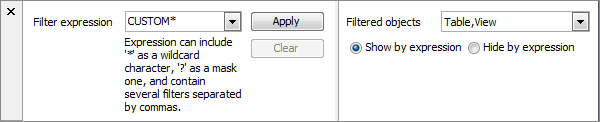
| • | Specify the Filter expression. The expression can contain any part of object name combined with an asterisk ('*') as a wildcard character and a question-mark ('?') as a mask character. |
| • | Define the Filtered objects, object types for filtering in the explorer tree. |
| • | Check the according radio button (Show by expression, Hide by expression) to define whether database objects will be shown or hidden in accordance with the filter expression. |
| • | Click Apply button. |
Note: A filter expression, if applied to the content of Database Explorer, is applied to the content of Object Manager and Object Browser as well.
| Prev | Return to chapter overview | Next |