







 Partners




Artikel: Benutzen Sie die Leistungsstärke von neuen MySQL 5 Features mit MySQL Maestro!
Nov 7, 2005
| Vorherig | Weiter |

Dieser Artikel stellt das neue MySQL Maestro v.1.95 vor, das alle jüngsten Features von MySQL 5.x unterstützt. Mit der Hilfe von MySQL Maestro Tools ist es möglich die Entwickler mit bewährten und Komfortablen Mitteln zu versorgen, die für die Erstellung von gesicherten, flexiblen, simplen und effektiven Anwendungsprogrammen, die Views, Trigger, gespeicherte Prozeduren und Funktionen benutzen, vorgesehen sind. Vorteile von diesen SQL-Objekten und Methoden, mit denen MySQL Maestro sie verwalten hilft, sind hier auch beschrieben.
MySQL Maestro ist das kraftvolle grafikbasierte administrative Tool für MySQL Server Verwaltung, Kontrolle und Entwicklung. MySQL Maestro unterstützt alle letzten Versionen von MySQL, MySQL 4.1.x/5.0.x einschließlich.
MySQL steht in gutem Ruf, eine Datenbank extrem leicht zu installieren, benutzen und konfigurieren. Dabei geht MySQL mit seiner Leistungsfähigkeit und Preis/ Leistungsfähigkeit in Führung. Bisher MySQL stand in Verruf wegen der unverlässlichen Sicherung von der Datenintegrität, und deshalb konnte es in großen Projekten angewendet werden. Die Startversion 5.0, MySQL lässt den Entwicklern und Datenbankadministratoren Anwendungsprogramme liefern und verwalten, die ACID Transaktionen, gespeicherte Prozeduren und Funktionen, Trigger, Views usw. benutzen.
MySQL Maestro lässt erfahrenden Benutzern die ganze Macht von der Leistungsfähigkeit, die für die neue MySQL Version bezeichnend ist, fühlen. Dabei versorgt MySQL Maestro den Benutzer mit einem komfortablen graphischen Interface, das die Arbeit mit MySQL Server leicht und eindeutig für einen Einsteiger macht.
Was für neue Features MySQL v.5.x und auf welche Weise können sie benutzt werden? Wie kann MySQL Maestro helfen?
Beispiele, die in diesem Artikel angeführt sind, wurden im folgenden Umfeld getestet:
MySQL 5.0.13 (rc 1) installed under Windows XP, MySQL Maestro v.1.95.
DB Struktur:
 DELETE FROM `author` (
    `author_id` int(11) default NULL,
    `author_name` varchar(100) default NULL,
    `author_phone` varchar(15) default NULL,
    `author_address` varchar(100) default NULL,
    `author_city` varchar(100) default NULL,
    `author_country` varchar(100) default NULL,
    KEY `author_id` (`author_id`)
 ) ENGINE=InnoDB;
 DELETE FROM `book` (
    `book_id` int(11) NOT NULL auto_increment,
    `book_price` float(9,2) default NULL,
    `book_name` varchar(100) default NULL,
    `author_id` int(11) default NULL,
    `pub_id` int(11) default NULL,
    `book_note` varchar(255) default NULL,
    `book_sell_amount` int(11) default NULL,
    `book_bestseller` tinyint(4) default NULL,
    PRIMARY KEY  (`book_id`),
    KEY `pub_id` (`pub_id`),
    KEY `author_id` (`author_id`),
    CONSTRAINT `book_ibfk_1` FOREIGN KEY (`author_id`)
        REFERENCES `author` (`author_id`),
    CONSTRAINT `book_ibfk_2` FOREIGN KEY (`pub_id`)
        REFERENCES `publishers` (`pub_id`)
 ) ENGINE=InnoDB;
 DELETE FROM `publishers` (
    `pub_id` int(11) NOT NULL auto_increment,
    `pub_name` varchar(100) default NULL,
    PRIMARY KEY  (`pub_id`)
 ) ENGINE=InnoDB;
1.Views
View ist eine alternative Weise, Daten aus einer oder einigen Tabellen herauszuziehen. View ist einem Filter gleich, der Daten aus Tabellen durchlässt, bevor ein Benutzer sie sehen kann. Wenn ein Benutzer eine neue View erstellt, sind Daten aus Tabellen nicht dupliziert. Alle View-Daten sind in Tabellen gespeichert, von denen die View erstellt ist. Die Arbeit mit Views ist der Arbeit mit üblichen Tabellen gleich.
Views ermöglichen Entwickler Daten leicht zu schützen. Außerdem können Views effektiv sein, wenn die Datenbankstruktur verändert ist (d.h. eine Tabelle ist in mehrere geteilt) und wenn ein Benutzer in einem gewohnten Stil zu arbeiten vorzieht.
Views-Vorteile:
- Fokussierung: Views ermöglichen dem Benutzer sich auf interessanten Daten zu konzentrieren oder auf einem Task, das er zu lösen braucht. Daten, die der Benutzer nicht braucht, können zurückgehalten sein.
Zum Beispiel, ein Benutzer will sich mit einer Bestsellerliste befassen. Dafür wäre es bequem die folgende View zu erstellen:
CREATE VIEW `bestseller` AS     SELECT       `book`.`book_id` AS `book_id`,
      `book`.`book_price` AS `book_price`,
      `book`.`book_name` AS `book_name`,
      `author`.`author_name` AS `author_name`
    FROM       (`book` JOIN `author`)
    WHERE       (`book`.`book_bestseller` = 1)
Leichte Datenbehandlung: Views erleichtern nicht nur die Datenperzeption sondern auch die Arbeit mit ihnen. Oft benutzbare Joins, Projections und Selects sind für Views bestimmt. Dies ermöglicht alle Konditionen nicht zu zeigen, alle Male wenn eine folgende Operation ausgeführt wird.
Zum Beispiel, folgende Abfragen haben das selbe Resultat:
| Without view: | With view: |
|---|---|
SELECT `book`.`book_id` AS `book_id`, |
SELECT * FROM bestseller ORDER BY author_name |
- Flexibilität: Views lassen verschiedenen Benutzern zu verschiedene Standpunkte auf die selbe Daten zu haben. Das ist sehr wichtig, wenn verschiedene Benutzer mit verschiedenen professionellen Erfahrungen sich mit der gleichen Datenbank beschäftigen.
Seller's view:
CREATE VIEW `seller` AS     SELECT         `book`.`book_id` AS `book_id`,
        `book`.`book_price` AS `book_price`,
        `book`.`book_name` AS `book_name`,
        `author`.`author_name` AS `author_name`
    FROM         (`book` JOIN `author`)
Publisher's view:
CREATE VIEW `publisher` AS     SELECT         `author`.`author_name` AS `author_name`,
        `author`.`author_phone` AS `author_phone`,
        `author`.`author_address`
            AS `author_address`,
        `author`.`author_city` AS `author_city`,
        `author`.`author_country` AS `author_country`,
        `book`.`book_name` AS `book_name`,
        `book`.`book_sell_amount` AS `book_sell_amount`
    FROM         ((`author` JOIN `book`) JOIN `publishers`)
    WHERE
(`publishers`.`pub_name` = 'Some publisher') -
Security: users can request and modify only information that they can see. The rest part of database is remaining concealed and inaccessible. With the help of GRANT and REVOKE it is possible to permit every user access to certain database. Objects and views are among them. It is easy and at the same time effective mechanism to provide security protection. Defining different views and setting different rights to them it is possible to grant object permissions just for certain subsets of data.
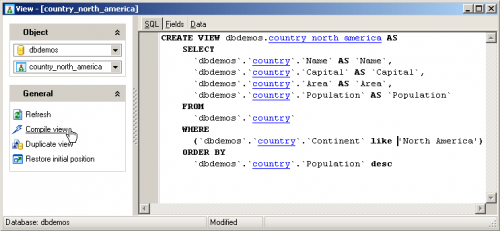
Use of views becomes much easier with help of MySQL Maestro's View Editor. This editor allows editing the existing view definition.
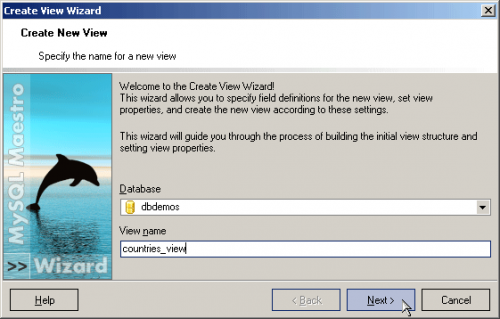
Create new view basing on some tables or another views can be done with MySQL Maestro's Create View Wizard in a very obvious way.
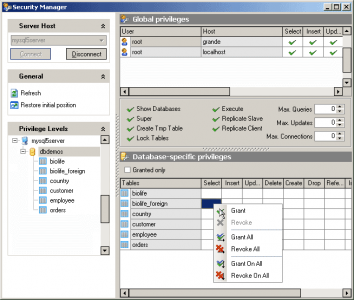
In order to define view, user needs to get permission to invoke the CREATE VIEW command from database owner and have corresponding access to all tables and views that are used in defining that view. Applying MySQL Maestro's Security Manager, DBAs can easily set privileges. Permission management to new MySQL objects is also implemented in MySQL Maestro. That is making MySQL server administration very simple and comfortable.
2. Stored procedures and functions
Stored procedures are the set of SQL queries that are kept in the server. Once they are written they cat be implemented repeatedly.
Stored procedures and functions advantages:
-
Performance improvement: stored procedures and functions considerably increase capacity, efficacy and flexibility of SQL. The reason of this is that stored procedures are compiled beforehand. During first procedure execution server's SQL query processor is analyzing procedure and prepare execution plan, which is kept in system table. Later on, procedure is performed according to this plan. Since the main part of query processing has been done then stored procedures are implemented in a moment.
-
Reuse: some algorithm can be realized in stored procedure and then implemented many times. Besides it can be used in common by many clients/applications (even in various languages).
-
Security: stored procedures allow providing more data security degree. Some user can be permitted to invoke procedure. At the same time he/she can't directly modify data that user don't have access through this procedure. For example a seller in bookshop has rights to update information in table BOOK. When a book is bought he brings in changes in table BOOK. At the same time information about author's earnings needs to be changed in table AUTHOR to which seller don't have rights. This can be easily organized using stored procedures.
-
Decrease of network cost: using stored procedures more of the work is done on the server side and less is done on the client/application side. Thus less information needs to be sent between server and client.
If you want easy create your own stored procedures and functions one of the best ways is to use MySQL Maestro's Stored Procedure Editor. This editor allows you to execute the existing stored procedure or edit its definition (procedure name, parameter list, procedure body, etc.). It opens when you create a new procedure or edit the existing one.

Creating procedures is becoming simple with MySQL Maestro's Create Procedure Wizard that guides you through the process of creating a new stored procedure.

3. Triggers
Stored procedures are very convenient when user needs to develop some complex algorithm and call it in requisite time. But sometimes some acts should be done under certain conditions. In these cases triggers are used. Trigger is a stored procedure that is associated with a table and that activates when a user tries to insert, update or delete data into/from table.
Triggers advantages:
-
Referential integrity provision: user can use triggers for ensuring referential integrity in database. Referential integrity defined in the DELETE FROM statement is rather weak as it can't solve some problems. Cascade data change in interrelated tables is among them. Triggers also allow to support more complicated constrains compared to rules, allow compare modified data and realize some actions as the result of this comparison.
-
Automation: triggers are invoked automatically. They are executed in any case if an event occurs.
-
"If, then"-analysis: triggers can fulfill simple "if, then"- analysis. Trigger can compare table state before and later data modification and act basing this comparison.
Example:
CREATE TRIGGER upd_check BEFORE UPDATE ON book
FOR EACH ROW BEGIN   IF NEW.book_price < 0 THEN         SET NEW.book_price = 0;
END IF; END; - Business space determination: triggers are very important in automation of business process. Triggers can be used to send manager information about deficient of goods on warehouse and importance of replenishment in case if total amount of goods is less then it is important.
Work with triggers can be simplified with the help of MySQL Maestro's Trigger Editor. This editor allows you to set up trigger properties when you add or edit a trigger. Editing triggers isn't standard for MySQL because there is no ALTER TRIGGER statement, but it is implemented in MySQL Maestro.

New-appeared MySQL's features (Views, Stored Procedures and Triggers) are making MySQL 5.x rather powerful DB Server that can be used even in large enterprise products. MySQL Maestro has all the tools for developing easy and effective applications starting from small to industrial. Also MySQL Maestro provides DBAs with a lot of tools for DB administration including new objects support.
| Vorherig | Weiter |
